![Netstream_White_RGB[1].svg]](https://support.netstream.cloud/hubfs/Netstream_White_RGB%5B1%5D.svg)
Once your account has been set up, you will automatically receive three emails from us.
The email with the subject "Welcome to the Netstream Cloud" is relevant for the first steps:
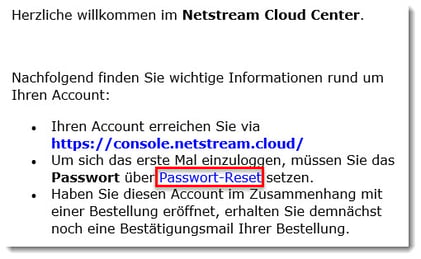
No password is generated automatically for the login. You first need to reset it yourself. To do this, click the corresponding link in the email: Password reset
Enter the email address you used to register.
You should then shortly receive an email with the subject "Reset password".
ℹ️ NOTE
The reset link is only valid for 2 hours.
You can now either have a password generated or set one yourself.
ℹ️ NOTE
This password is used across all your cloud services, including VDC, S3, etc., and is therefore synchronised across all these services.
If it has worked, you can follow the Click here link in the confirmation to go directly to the "Netstream Cloud Center" (NCC) customer portal:
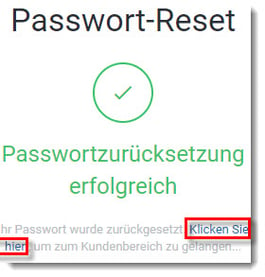
Alternatively, you can log in at any time via https://console.netstream.cloud/.
You will also receive another email confirming the password reset.
Changing your password
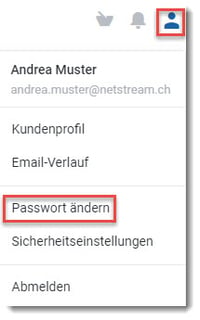
If you want to change your password later, you can do this as follows. Go to the top right of the NCC and then click Change Password:
ℹ️ NOTE
It may take a few minutes until the password change has been applied in every environment (VDC, S3, etc.).
If you ever forget your password, you can reset it by clicking "Forgot?" in the login screen.