![Netstream_White_RGB[1].svg]](https://support.netstream.cloud/hubfs/Netstream_White_RGB%5B1%5D.svg)
To do this, you can define a policy in the Object Storage portal. This is explained in the following guide.
Creating a bucket
When you create a bucket, you must set the «Object Lock» flag to «Enable». When you save, a warning is shown that this setting cannot be reversed and that «Versioning» will be enabled for the bucket.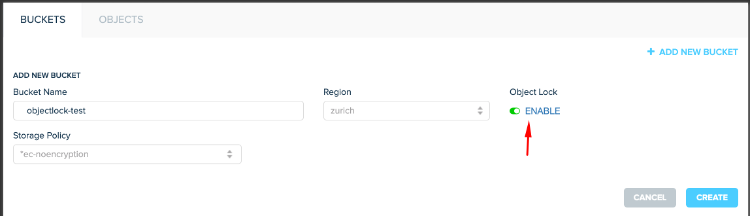
The newly created bucket is then shown with a small padlock. This means that Object Lock has been enabled successfully.
You can now use the «Properties» function and then the «Object Lock» tab to define the policy and the retention period.
As a general rule, the bucket configuration (retention period) is used as the basis for the individual objects. If file A is uploaded on day 1 and the retention period is 7 days, it can be deleted on day 8. File B is uploaded on day 3 and can therefore be deleted on day 10.
Object Lock Policies
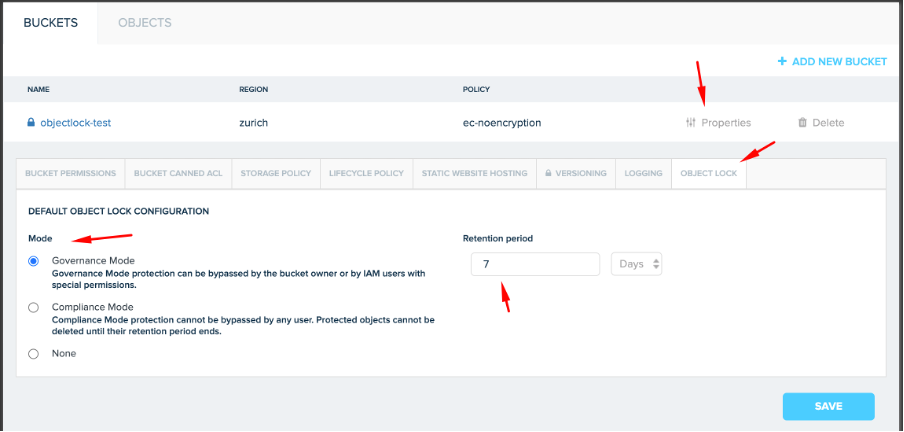
«Governance Mode» means that the objects in the bucket cannot be changed or deleted during the defined period (in this case 7 days), unless you use a user created specifically for this purpose with special permissions (or the owner of the bucket).
«Compliance Mode» means that, as with «Governance Mode», the objects in the bucket cannot be changed or deleted. The important difference is that even the administrator will no longer be able to change this. The data is written and remains unchangeable from then on until the retention period expires.
«None» means that Object Lock is enabled as a function on the bucket, but no default policy is defined. Backup solutions such as Veeam set the «Retention policies» on the objects themselves directly via the API, so you do not need to (and should not) set a default here.
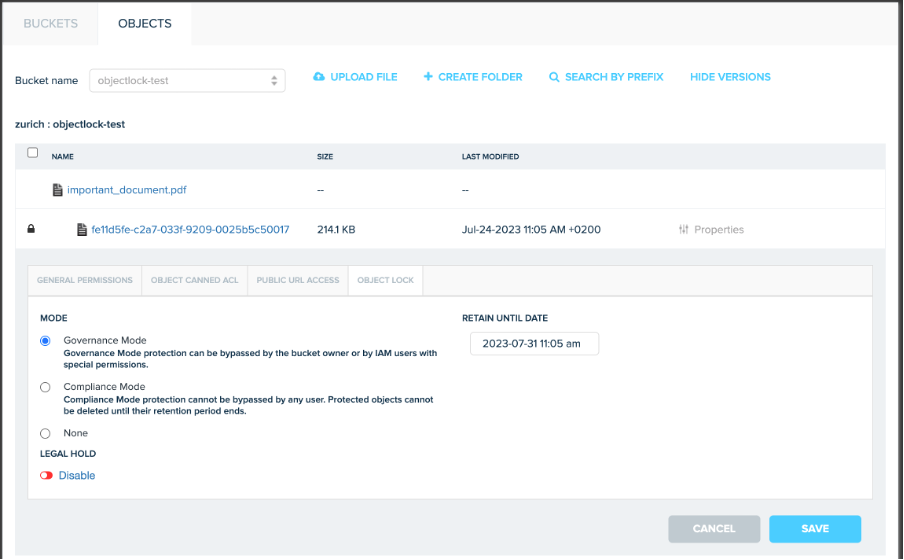
On the individual objects, you can now see that the delete function is not shown. Under «Properties», you can see how long the current version remains locked.