![Netstream_White_RGB[1].svg]](https://support.netstream.cloud/hubfs/Netstream_White_RGB%5B1%5D.svg)
To follow the instructions in this article, we recommend that you first read this article: Quickstart: Object Storage (S3)
Before you start, make sure you have the following details to hand for the configuration:
- Access key ID
- Secret key
- Bucket name
The Rubrik backup appliance lets you use SLA definitions to archive your backups to S3 storage after a certain period of time.
Setting up the archival location
First, you need to set up the archival location in Rubrik. To do this, log in to your Rubrik appliance and then click "Archival Locations" in the settings:
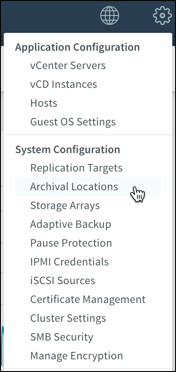
In this menu, click "+" at the top right:

Then enter the following details:
| Archive type | Object Store |
| Object store vendor | S3 Compatible |
| Access key | <Access key ID> |
| Secret key | <Secret key> |
| Host name | s3-zurich.s3.netstream.cloud |
| Bucket prefix | Any name for the buckets |
| Number of buckets | 1 |
| Archival location name | Any name for the location |
| RSA Key | Create as described below |
| Enable archive consolidation | Yes (more information here) |
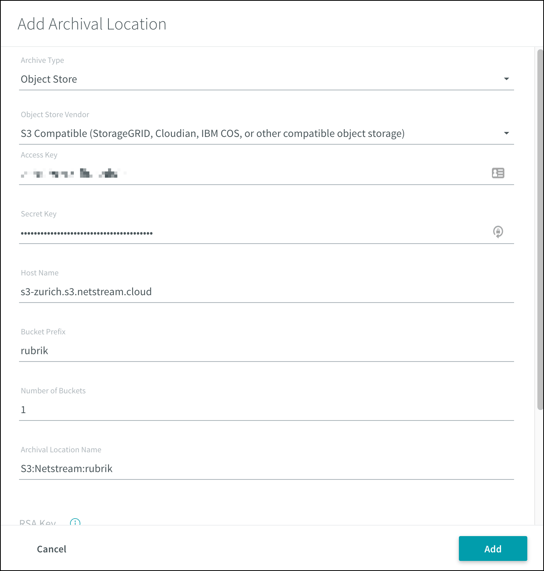
The RSA key is used to encrypt the backup and must be created as described in the Rubrik instructions:
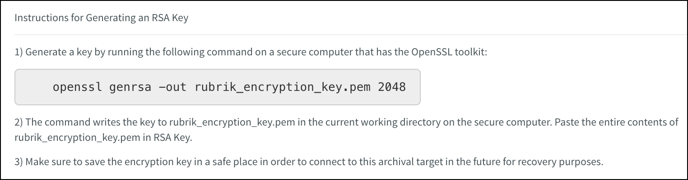
Finally, confirm the new archival location with "Add".
SLA Domains
In Rubrik, SLA domains define whether and when a backup is moved to an archival location. You can reach them by clicking "SLA Domains", then "Local Domains".
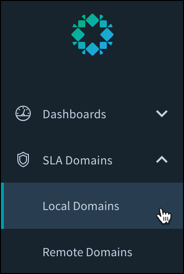
You can then either edit existing SLA domains or create a new one, and assign it to the relevant VMs or vApps.
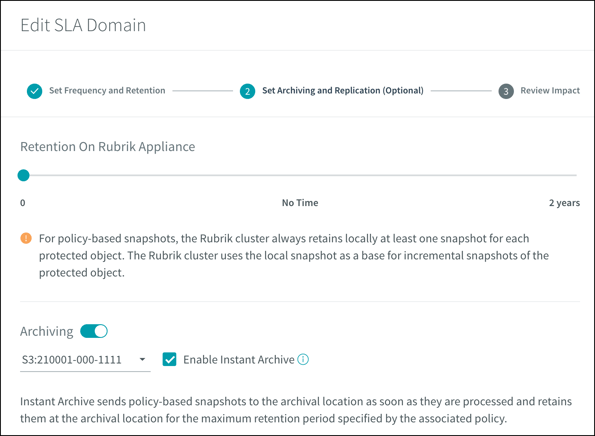
You configure the archiving of backups to S3 storage in the "Set Archiving and Replication (Optional)" menu when editing the SLA domain. You need to enable the "Archiving" option and select the relevant archival location.
You can find more information on configuring the Rubrik appliance here.