![Netstream_White_RGB[1].svg]](https://support.netstream.cloud/hubfs/Netstream_White_RGB%5B1%5D.svg)
The Netstream Cloud Center is your central hub for efficiently managing your customers and services as a Netstream reseller. You can cancel services for your customers directly in the Netstream Cloud Center.
Login
Log in to the Netstream Cloud Center at hub.netstream.cloud.
Select customer
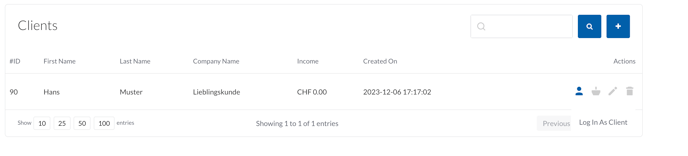
- Select the Reseller Area in the sidebar.
- For the customer you want, click the "Log In As Client" icon. You will be redirected to the login as that customer.
Cancel a service
- Select the service you want to cancel and click "Manage".

- In the left-hand bar, select " Request Cancellation".
- Feel free to leave us a reason or a note for the cancellation.
- Confirm the cancellation of the service.
Please note the stated notice periods. The standard notice period is 30 days. Annual bundles are renewed for a further year if they are not cancelled in time.