![Netstream_White_RGB[1].svg]](https://support.netstream.cloud/hubfs/Netstream_White_RGB%5B1%5D.svg)
The Netstream Cloud Center is your central hub for efficiently managing your customers and services as a Netstream reseller. To order additional licences within a service for your customers or to adjust the storage package, please proceed as follows.
Login
Log in to the Netstream Cloud Center at hub.netstream.cloud.
Selecting a customer
- In the sidebar, select the Reseller Area.
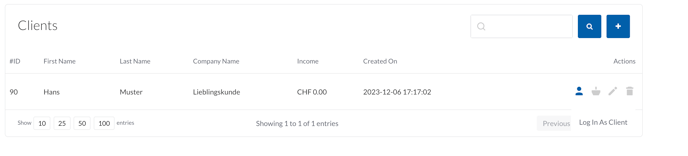
- Click the "Log In As Client" icon for the customer. You are redirected and logged in as the customer.
Upgrading or downgrading a service
- Select the service you want to upgrade or downgrade and click "Manage".

- In the left-hand bar, select " Upgrade/Downgrade Options".
- Enter the required number for the licences you want and click "Click to Continue >>" to complete the order.
It may take a few minutes until the changes have been provisioned.
For downgrades, please note the applicable notice periods. Upgrades are charged pro rata for the term of the service.